• 30 min read
Bambu Lab A2L Combo Review: A Giant Bedslinger with a Plotter Cutter Twist
Bambu Lab's A2L Combo scales up the A1 bedslinger platform to a massive 330×320×325 mm volume and adds an optional plotting and blade-cutting module. Here is our in-depth test after weeks of prints, cardboard cutting, and multicolor projects.
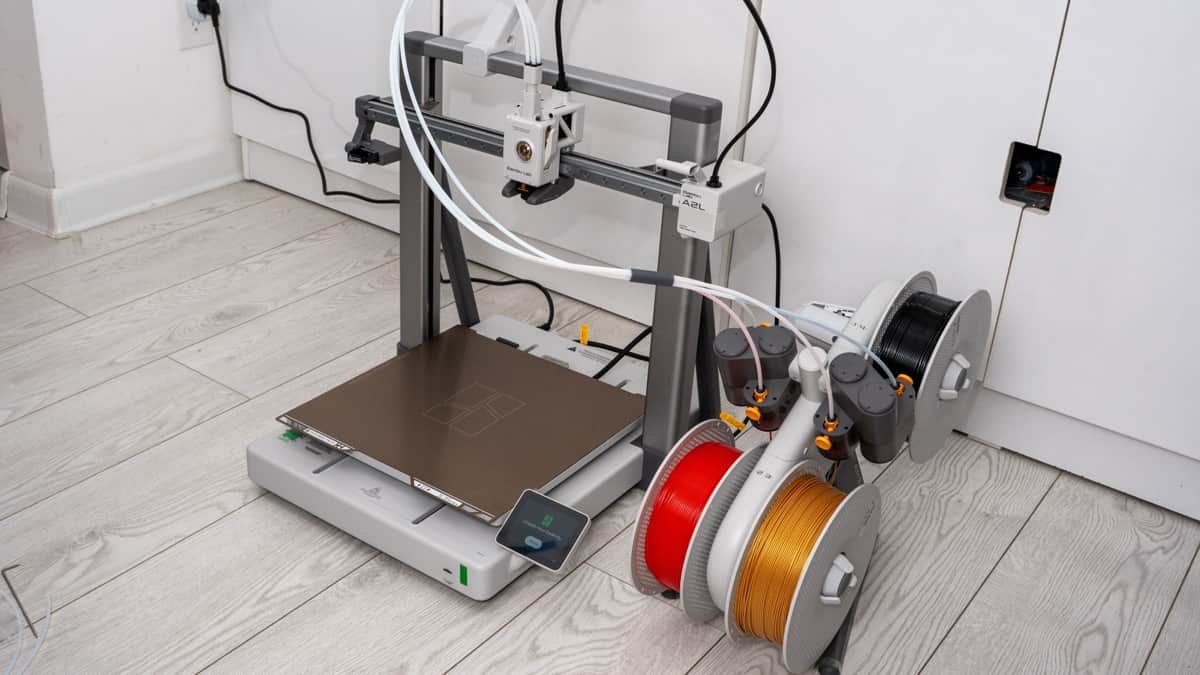
Image: Sergey Kuznetsov / for(geeks)
The Bambu Lab A2L Combo is an affordable large-format 3D printer built on a Cartesian bedslinger platform with a massive 330 × 320 × 325 mm build volume. In the Combo package, you get the AMS Lite four-spool feeder, while the cutting and drawing module is available as an add-on accessory—and it is precisely this hybrid capability that makes the A2L such an intriguing machine.
The printer hit the global market on June 1, 2026. In Russia, the Bambu Lab A2L Combo currently sells between 55,999 and 64,999 rubles. For this review, I spent several weeks running the A2L through its paces in my studio: printing functional parts and large figures in PLA and PETG, cutting paper, cardstock, and heat-transfer vinyl with the drag-knife module, and plotting vector line art with markers.
To be completely candid, I even found myself wondering whether I should swap my personal enclosed H2D/X2D machine for the A2L, purely for the sheer luxury of this giant bed and the plotter attachment. The A2L is by far the most accessible way to get a build plate comparable in size to flagship industrial machines. However, the trade-off is clear: you pay with substantial physical room space and the inability to print high-temperature engineering plastics. Let's walk through the entire machine from the ground up.
The A2L in the Lineup: Positioning and Pricing
The A2L expands Bambu Lab's entry-level 'A' family, picking up right where the popular A1 left off. The 'L' stands for Large. According to Bambu Lab's official data, the printable volume increases by 105% compared to standard 256 mm cube platform machines. The build surface measures 1,056 cm² compared to 655 cm² on the standard A1. Bambu Lab describes the A2L as a lightweight, open-frame cousin to their high-end H2S series: several key mechanical innovations from the flagship range are carried over here at a fraction of the cost, though it naturally skips the heavy enclosed chassis.
It is fascinating how Bambu Lab arrived at this particular size. According to their market research, a build envelope of approximately 320 mm on each side covers roughly 95% of all consumer and maker requirements: this includes full-scale cosplay helmets, wearable footwear prototypes, large home decor, and batch production runs. Engineering a build volume much larger than this becomes exponentially expensive: manufacturing costs skyrocket faster than usable volume, while moving-bed inertia creates severe mechanical hurdles. The A2L delivers almost identical volume to industrial cubes, but keeps the price accessible by adopting a moving-bed architecture.
In the United States, the standalone Bambu Lab A2L launched at $469, while the Combo with AMS Lite debuted at $569. In Europe, pricing was set at €379 and €489 respectively. In Russia, authorized dealers opened pre-orders prior to launch at around 45,000 rubles for the base unit and 59,000 rubles for the Combo. Today, dealers like Tsvetnoy Mir offer the Combo for 55,999 rubles, while 3D MALL and Lider-3D list it between 64,800 and 64,999 rubles. The standalone bare printer retails between 42,799 and 49,800 rubles.
The price delta between the bare printer and the Combo bundle is roughly 13,000–15,000 rubles. In my view, buying this printer without accessories makes very little sense. The AMS Lite is effectively an absolute necessity on a bed of this scale. When printing an oversized model, the AMS Lite functions not just as a multicolor changer, but as a continuous spool backup. Believe me: waking up in the morning to discover that your overnight print exhausted a 1kg spool and stalled out—leaving you scrambling to figure out how to salvage a half-finished Mandalorian helmet when the convention is tomorrow—is an experience nobody wants to relive.
Bambu Lab outlines the target audience very clearly: home decor enthusiasts, families with kids, cosplayers, and small-scale print farms. Dual extrusion is intentionally omitted; those who require it are directed in Bambu's FAQ towards the X2D. Because I own and use an X2D daily, I naturally found myself subconsciously comparing the A2L against a machine from a higher tier. What surprised me most was the pricing: for this money, I genuinely did not anticipate a 330 mm bed and such solid, high-precision assembly.
Unboxing & What’s in the Box
The shipping box for the Bambu Lab A2L Combo is colossal, emblazoned with the company's motto: 'MAKE ANYTHING AT HOME.' It serves as an immediate, honest heads-up about the physical presence this printer will demand in your room. Inside, every component is nested securely and thoughtfully in custom molded high-density foam. The printer ships semi-assembled in two primary chunks: the aluminum gantry frame and the heavy cast base. This saves critical space during freight, a standard practice for large moving-bed machines.
Included in the box is a double-sided textured PEI spring steel build plate and a pre-installed 0.4 mm stainless steel nozzle. The Combo package adds the AMS Lite four-spool feeder housing, its tabletop stand, a 4-in-1 PTFE tubing connector, and an extra spool holder that mounts directly to the gantry rail if you prefer running a single spool without the AMS. The comprehensive accessory toolkit includes hex wrenches, nozzle unblocking needles, silicone hotend socks, a tube of mechanical grease, and clearly labeled bags of assorted screws.
The build plate on the A2L is completely unique to this machine, and while unpacking, it is easy to mistake it for the plate from the H-series. The plate surface is fully textured with a gold PEI powder coat on both faces; it cleans easily with warm soapy water and releases prints effortlessly once cooled. Two warning stickers are fixed to the back of the plate, and leaving them on or peeling them off makes no functional difference—the heated bed underneath is pure cast aluminum.
Initial power-on is assisted by the full-color touchscreen with intuitive visual prompts. First, the setup wizard asks how you intend to connect to the printer: via the Bambu Lab cloud, locally across your Wi-Fi LAN without cloud services, or strictly offline via microSD cards. I almost always recommend cloud connectivity: it lets you monitor print status remotely via the camera, launch print jobs from anywhere in the world, and eliminates the tedious back-and-forth routine of carrying flash drives to the machine.
Next comes automated calibration. The A2L runs through an extensive self-tuning routine: adjusting vibration resonance compensation (input shaping), calibrating motor noise cancellation, and building a high-resolution topographical bed mesh. The full calibration takes about 45 minutes—so budget that time upfront; you cannot simply lift it from the box and immediately press print. The nozzle tip itself serves as the electrical contact probe, simultaneously zeroing the Z-offset for a perfect first layer. It can re-verify leveling before every job, and manual belt tensioning is completely unnecessary. Reflecting back on my first Anycubic Delta years ago—where I had to buy aftermarket belt tensioners and fiddle with calibrations for hours—today's automated experience feels almost like magic.
Assembly: Two Hours and Plenty of Screws
The Bambu Lab A2L goes together without any soldering or mechanical tinkering, but there is plenty of physical wrenching involved. You need to mate the heavy aluminum gantry into the base sockets, secure the heated bed onto the Y-carriage, route wiring harnesses through protective clips, and drive dozens of hex screws of varying lengths. It takes patience: my assembly took almost two hours from slicing open the carton to turning on the power switch. The visual manual is clear, though in a couple of steps I found myself double-checking the diagrams to ensure the orientation was exact.
The golden rule during assembly is to read the documentation carefully. Several screw sizes look nearly identical to the naked eye, and swapping them is all too easy. Pay special attention to the Y-axis linear rails: they arrive dry from the factory and will prompt for lubrication after just a few prints. It is vastly more convenient to lubricate the Y-axis steel rails during assembly while the carriage is open, using the supplied grease tube, rather than having to take things apart later.
The build quality of the A2L is remarkably robust, which comes as a pleasant surprise for an entry-to-mid tier printer. Diagonal tie-rod struts support the frame from behind to stiffen the vertical towers against wobbling. Concealed inside the top horizontal gantry beam are two granular dampers: sealed capsules filled with micro-beads that dissipate mechanical vibrations through particle friction. If you shake the gantry frame by hand, they rattle like loose pebbles inside. Do not panic—that is by design.
The Y-axis timing belt measures an impressive 22 mm in width with a 1.5 mm tooth pitch, and half of its total length is completely toothless. This prevents belt teeth from riding directly over the idler bearings, which permanently eliminates microscopic ringing ripples on finished part walls. It is a rare, deeply clever bit of mechanical engineering. With hardened steel linear guide rails, linear ball bearings, and synchronized dual Z-axis leadscrews neatly integrated into the chassis, the printer looks and feels considerably more premium than its price tag suggests.
Footprint & Dimensions: Why It Lives on the Floor
My primary practical critique of the Bambu Lab A2L centers on its size. But that is the unavoidable physical reality of an oversized bedslinger. The static chassis measures 544 × 529 × 505 mm and weighs 12.8 kg. However, because the giant 330×320 mm heated bed travels forward and backward along the Y-axis during operation, it demands an active clearance footprint of at least 600 mm in width and 650 mm in depth.
Even then, the moving bed will protrude past the table edges. The official manual recommends maintaining at least 25 cm of rear clearance for the thick wiring chain and 10 cm in front. In practical terms, that means your table needs to be around 90 cm deep—something very few standard home offices possess. When you place the AMS Lite feeder beside the printer, the overall width expands to nearly 800 mm. The entire operational footprint occupies roughly 750 × 750 × 800 mm; with realistic working breathing room, you need a full 1 × 1 meter space.
I could not find a tabletop deep enough in my studio, so the printer ended up living directly on the floor. Before ordering one, reach for a measuring tape rather than eyeballing your space. While you could technically print an overhead bracket to mount the AMS Lite on top of the gantry, that solution is questionable: adding mass to the top of a tall frame increases inertia wobble. Setting the machine on the floor turned out to be the right decision for another reason: the heavy moving bed generates substantial momentum. A lightweight table (like an IKEA Lack) will violently shake; in fact, the AMS Lite rattled right off a lightweight side table after 45 minutes of printing. From a shaky workbench, loose tools will rattle off, and on a high table, the printer itself could be at risk. If you only print single colors, you can use the gantry single-spool arm to save width.
To address vibration on less rigid surfaces, Bambu Lab provides a 'Silent' motion profile and a 'High Quality' mode in the slicer. Both reduce rapid jerk movements, running significantly gentler at the expense of print speed. If the floor is out of the question, I strongly recommend placing the A2L on a heavy, solid wood workbench—ideally clamping the legs down.
Under the Hood: Servo-Extruder, Dampers, and an 80°C Bed
The all-metal hotend on the Bambu Lab A2L heats up to 300°C, while the heated bed is capped at 80°C. Bambu Lab's reasoning here is entirely practical: as an open-frame printer, the A2L is built strictly for PLA, PETG, and TPU. Attempting to heat a massive 1,056 cm² aluminum plate past 100°C would severely overload standard domestic electrical circuits, and high-temp plastics like ABS or Nylon would warp uncontrollably in an open draft anyway. Print speeds reach up to 500 mm/s, with maximum acceleration capped at 10,000 mm/s²—roughly half that of the CoreXY X2D.
The bed is engineered with remarkable care. Across its entire surface, the temperature variance is held to approximately 3°C, which is an outstanding achievement for a plate of this surface area. In each of the four corners, Bambu embedded strong auxiliary magnets. When a massive print cools and tries to curl upward at the edges, these corner magnets actively prevent the spring steel plate from lifting off the aluminum substrate. The build plate shares the same format as the H2C, making spare sheets easy to source (note that H2D and H2S plates will not fit).
The direct-drive extruder features a permanent magnet synchronous servo motor (PMSM) with closed-loop feedback. It maintains steady pushing torque at high flow rates and immediately detects filament feeding hiccups. Beside the silicone nozzle wipe station, Bambu added a physical filament blob detection lever: if a massive blob of molten plastic begins accumulating around the nozzle heater block, the lever deflects and triggers an emergency pause. The machine also carries over the tangle detection, filament runout, and nozzle clog sensors from the A1.
Active eddy current flow compensation continuously monitors molten extrusion dynamics, actively adjusting feeding pressure on the fly for buttery smooth corners. Hotend maintenance is equally user-friendly: the nozzle snaps into place with a magnetic clip, allowing tool-free swaps in under 30 seconds without wrestling with heated wrench blocks. Bambu offers 0.2, 0.4, 0.6, and 0.8 mm nozzles in stainless and hardened steel.
The heated bed is driven by an ultra-wide 22 mm belt over dual steel linear rails. The carriage plate is die-cast aluminum with structural webbing underneath to resist thermal warping. When the bed moves, you hear a deep, muffled whoosh rather than high-pitched stepper whine: Bambu's active motor noise cancellation algorithm feeds an inverted acoustic wave to the coils, keeping mechanical noise surprisingly subdued.
Print Quality: From Fine Miniatures to Massive Builds
I tested the Bambu Lab A2L primarily with PLA and PETG, focusing on both intricate small objects and massive structural models. With PLA, things initially started with a hiccup: parts were peeling up at the corners. The solution was simple: I bumped the bed temperature to 60°C and thoroughly wiped down the build plate with technical isopropyl alcohol (oils from fingers during the lengthy assembly process had contaminated the surface). From that point onward, adhesion was rock solid across every single print.
A standard 3D Benchy benchmark in PLA prints in 38 minutes with virtually zero ringing ripples on the hull. A Gridfinity storage bin came off the plate with impeccably smooth, vertical walls. In the KSR tolerance benchmark, even the tightest 0.2 mm clearance pin rotated freely straight off the bed without binding. A single-layer first-layer test sheet peeled off as one cohesive, perfectly textured sheet.
Large models are where the A2L truly comes into its own. A full-scale Mandalorian helmet takes almost two full days of non-stop printing. You simply drop the model into Bambu Studio, turn on tree supports, and hit send. An oversized figurine occupying nearly the full Z-height took over 30 hours. On early launch firmware, such multi-day prints occasionally experienced glitches where the AMS Lite spool backup failed to engage; Bambu Lab quickly patched these bugs in OTA firmware updates. The spool backup is invaluable: a 1kg spool often isn't enough for giant prints, so you simply load 2 to 4 spools of the same filament, configure auto-refill, and sleep peacefully knowing an empty spool won't ruin a 40-hour print.
The expansive bed is also ideal for batch printing dozens of small parts at once, though there is a specific software limit: the 'Skip Object' feature only works if there are 64 or fewer discrete models on the plate. If you pack 79 items onto the bed, the cancel-individual-object button disables entirely, meaning a single detached piece forces you to cancel the entire batch. Other print tests passed with flying colors: overhangs up to 65° printed cleanly without supports, tiny embossed typography remained sharp and legible, and stringing was nonexistent. A massive 300 mm round serving tray came off the bed without warping, and five identical calibration cubes measured within margin-of-error tolerances across all axes.
The inherent weakness of this kinematic architecture remains tall, narrow objects. Because the bed physically oscillates back and forth, taller models experience increasing leverage and sway. On a slender, tall PETG tower, subtle layer shift artifacts will manifest near the top. The remedy is careful orientation in the slicer and activating the 'Slow Down at Height' feature, which progressively curtails velocity and acceleration as the model grows. Wide flat PETG parts can also exhibit shrinkage lift, which is easily mitigated with brim ears and liquid bed adhesive. In terms of overall throughput, the A2L trails Bambu's CoreXY H-series printers by roughly 10–20%.
Acoustic noise was measured using a calibrated smartphone meter, and our numbers matched Bambu's claims. In Quiet mode, the A2L hums along at 49 dB; in Standard mode, it hovers around 52 dB (averaging roughly 50 dB in typical operation). The loudest element is the part cooling fan spooling up during bridges and steep overhangs. For an open-frame printer of this size, it is remarkably quiet, though I still would not place it in a bedroom (nor should you keep an open-frame printer without filtration near where you sleep).
Power consumption was another pleasant surprise. During the initial warm-up surge when the massive bed heater kicks on, power peaks briefly near 900W. Once up to temperature, steady-state consumption drops to approximately 120W when printing PLA, and 140–150W for PETG. For a heated bed of this surface area, that is impressively efficient.
AMS Lite: Four Colors and Open Spools
The AMS Lite unit bundled with the Bambu Lab A2L Combo holds four spools on independent rotating spindles. Four individual PTFE guide tubes run from the unit directly to the toolhead, and the order in which you plug them into the 4-in-1 toolhead manifold does not matter at all. For a while, I tried to figure out which tube mapped to which slot, until it dawned on me that the printer handles AMS channel routing automatically. The spindles are spring-loaded with dedicated drive motors per spool, effortlessly accommodating cardboard spools, wide spools, and lightweight third-party reels. The unit automatically reads RFID tags on official Bambu filaments; third-party spools require manual color and material entry in the UI.
Filament swaps happen noticeably faster than on the enclosed box-style AMS because the filament only needs to retract a few centimeters into the manifold rather than all the way back through a long Bowden tube. However, purge waste ('poop') remains an unavoidable reality of single-nozzle multicolor printing. On a large printer, the AMS Lite plays an equally vital second role as an automated filament backup: when one spool runs dry, the printer immediately switches to the next spool of the same material and resumes printing without pausing. This alone makes buying the A2L without the Combo package almost counter-productive.
The downsides of single-nozzle multicolor are well established. Because the nozzle must be purged and wiped clean at every color change, print time and waste multiply quickly. A decorative panda figure printed in a single color took 2 hours and 40 minutes; printing the exact same model in three colors stretched the print time to 6 hours and 46 minutes.
Bambu Studio calculates purge waste volume in advance, and you can significantly cut waste by tuning the flushing volumes and enabling 'Flush into Infill'. But large multicolor prints remain inefficient on the A2L. Brittle specialty filaments like aged PLA+ can snap inside the feed tubes, and clearing crumbs takes effort. On the flip side, pulling snapped filament from an exposed open tube is far easier than dismantling an enclosed AMS hub.
However, the single biggest compromise of the AMS Lite is its open architecture: the spools sit exposed to ambient room air, absorbing humidity over time. With my enclosed X2D and sealed AMS, moisture was never something I had to worry about. On the A2L, you really should remove moisture-sensitive filaments after a print and store them in vacuum bags with desiccant or an active filament dryer. Moist filament punishes you with stringing and popping bubbles in the extrusion. If your room humidity stays below 30%, you can manage, but in 40%+ humidity, a dedicated filament drybox is essential.
If four colors aren't enough, the ecosystem can scale up: the A2L supports up to four enclosed AMS units plus one AMS Lite, providing up to 19 color channels. Note that an enclosed AMS occupies one buffer port, which disables one slot on the AMS Lite. Running active heating in an AMS 2 Pro or AMS HT on the A2L requires a secondary external power brick—solving the moisture problem, but claiming even more floor space around an already crowded setup.
The Plotter Module: Precision Cutting and Pen Drawing
The cutting module for the Bambu Lab A2L is sold as a separate upgrade kit, but it is unquestionably worth every penny. The underlying idea is refreshingly brilliant: since you already have a high-precision Cartesian CNC machine moving across three axes, why not attach a knife, a marker, or an engraver? Bambu Lab executed this brilliantly. The Cutting Upgrade Kit includes the drag-knife cutting module, a spring-loaded pen holder, a dedicated build plate with StrongGrip and LightGrip adhesive mats, two 45° carbide blades, a weeding hook for peeling cut materials, and two oil-based markers (red and black). In the US, the kit retails for around $69; in Russia, Tsvetnoy Mir sells it for 15,500 rubles. There is no laser module for the A2L, nor will there be: an open-frame printer cannot safely house a laser cutter without eye-safety hazards.
The tungsten carbide blade is ground to a 45° angle with a 0.35 mm thickness. Software-controlled cutting downforce adjusts continuously from 50 to 600 grams-force (gf), supporting materials up to 0.5 mm in thickness. This matches the capability of dedicated consumer craft plotters: paper, cardstock, vinyl, heat-transfer vinyl (HTV), and thin leather are supported with ease (thick chipboard and plywood remain beyond its capability). The 300 × 300 mm cutting platform accepts full A4 and US Letter sheets with room to spare.
| Cutter Module Parameter | Specification |
|---|---|
| Blade Geometry | 45° angle, 0.35 mm tungsten carbide blade |
| Cutting Downforce | 50 to 600 gf (grams-force), software controlled |
| Maximum Material Thickness | 0.5 mm |
| Adhesive Working Surface | 300 × 300 mm (supports full A4 & US Letter sheets) |
| Adhesive Mats Included | StrongGrip (heavy materials) & LightGrip (paper, thin vinyl) |
| Kit Contents | Cutter module, pen holder, 2 blades, weeding hook, 2 markers |
| Software Suite | Bambu Suite for Windows & macOS |
| Sheet Alignment | Smartphone photo alignment via Bambu Handy app |
| Retail Price | ~$69 USD / 15,500 ₽ |
Mounting the module takes less than two minutes without any tools. The heated bed drops down, the textured PEI plate is set aside, and the adhesive cutting platform is placed on the bed. You pop off the front plastic faceplate of the extruder toolhead, slide the cutting module onto the rail until it clicks, and lock the lever. A thin communication cable plugs into a dedicated port behind the toolhead, and the safety cap is removed from the blade. The hotend remains installed—the printer simply parks it off to the side without heating. You don't even need to disconnect the AMS PTFE tubes.
That small cable is not just for power: the cutting module houses an active force sensor. It assists during automatic calibration and ensures continuous, precise downforce on the blade throughout the cut. Following the initial snap-on, the printer guides you through an automated calibration routine on screen, zeroing blade depth without any manual intervention.
The cutting platform is double-sided: StrongGrip holds dense materials firmly, while LightGrip provides a gentle tack. The lighter and more delicate your paper, the softer the adhesive you need. Never discard the transparent protective cover film: you must replace it after every session to prevent dust and airborne fibers from ruining the adhesive. Like 3D printing build sheets, cutting mats are consumables that will eventually wear out, so picking up a spare mat is wise.
Cutting and drawing tasks are not prepared in Bambu Studio. Instead, Bambu created a dedicated companion application called Bambu Suite for Windows and macOS. You import vector graphics (SVG/DXF) or raster images, assign material cut profiles, and dispatch the job. You can design graphics in Canva or Illustrator and pull in logos directly from JPGs. Bambu Suite includes pre-tuned cutting presets for official materials, and MakerWorld already hosts a thriving library of community cutting and plotting templates.
In my testing, I cut standard copy paper, heavy 250 g/m² cardstock, and plotted line drawings with markers. One minor software glitch occurred early on during marker plotting, but an OTA firmware update resolved it permanently. For greeting cards, product packaging mockups, stencils, and custom stickers, the A2L performs with flying colors—to the point where I would no longer consider buying a standalone Cricut. Delicate paper requires a trick: even on the LightGrip mat, thin paper adheres so firmly that pulling it off can curl it into a cylinder; placing a plastic backing sheet and taping the corners prevents this. Cardstock and heat-transfer vinyl (HTV) cut cleanly; cutting custom t-shirt vinyl designs and ironing them onto apparel worked on the first try.
You can draw with nearly any pen, with a few caveats. The chuck is sized for thick barrel markers. If you want to use a standard ballpoint or fine liner, you can wrap a few turns of tape around the barrel for a snug fit. A standard pencil works too—the spring-loaded mechanism prevents the lead from snapping. The most elegant solution is to 3D print custom adapter collars for your favorite pens. Pen height is calibrated against a small plastic spacer block. Plotting and cutting can also be combined sequentially: first the pen sketches a logo or artwork, then you swap in the knife to cut out the perimeter decal.
The main functional limitation of the plotter module on the A2L relates to visual positioning. The high-end H-series printers feature an overhead top-down camera that looks directly down on the bed. The A2L lacks an overhead camera, so material alignment is done by taking a top-down photo with your phone in the Bambu Handy app. The app automatically deskews the photo and aligns your cutting paths to the image. It works well with practice, but requires care: shooting at an angle can cause vector paths to shift slightly. On the upside, using phone photos makes it very easy to nest shapes onto scraps of leftover vinyl.
The highly anticipated 'Print-then-Cut' capability has also arrived on the A2L (firmware 01.01.05.00 entered public beta in late August 2026). You print colorful designs on your ordinary desktop inkjet or laser printer, snap a photo in Bambu Handy to let the app detect registration marks, and the A2L cuts precisely along the printed artwork edges. It requires Bambu Handy 3.26.0 and Bambu Suite 1.4.0.00 or newer. This was the missing link for creating professional vinyl stickers and custom product labels.
In my view, the cutting module makes vastly more sense on the A2L than on high-end machines. On a $2,000 industrial printer, a drag-knife feels like a novelty toy. On a $469 bedslinger, it is a fantastic, high-value hybrid superpower. For cosplay, the synergy is obvious: the same machine that 3D prints a helmet can cut out vinyl logos, stencils, and decals to finish it.
Software, Connectivity, and Ecosystem
The A2L connects over 2.4 GHz Wi-Fi and includes an onboard microSD card slot. The memory card stores print models, records automatic 1080p timelapses, and lets you re-trigger previous print jobs directly from the touchscreen without turning on a computer. The built-in 1080p camera provides remote video monitoring in the Bambu Handy app and Bambu Studio, though at a low framerate intended strictly for checking progress rather than smooth video streaming.
The software experience is completely unified. 3D models are sliced in Bambu Studio, while cutting and drawing projects are handled in Bambu Suite. You can control and monitor the machine on your phone via Bambu Handy. Native support for the A2L was introduced in Bambu Studio 2.7.1: modern versions of the slicer visually highlight heated bed zones that require longer preheat times, providing clear time estimates for thermal equilibrium.
One of the greatest strengths of the Bambu ecosystem is verified material profiles. They are finely tuned and save hours of calibration. The slicer has built-in integration with the MakerWorld community repository, allowing you to send print jobs directly to the printer with a single click. For beginners, this is game-changing: you don't need to spend weeks tweaking retraction speeds and flow ratios for every new spool. You can launch your first prints straight from your phone in seconds.
The printer supports three operational modes: Bambu Cloud, LAN-only mode, and fully offline via microSD. In LAN mode, you can dispatch prints directly from Bambu Studio across your local network. However, stepping away from the cloud brings trade-offs: canceling individual failed objects on a crowded build plate requires the Bambu Handy app, remote monitoring outside the house is lost, and third-party filaments require manual material logging.
Head-to-Head: A2L vs. X2D, H2S, and Anycubic Kobra 3 Max
Comparing the Bambu Lab A2L directly against my home X2D is tricky because they are built for entirely different purposes. The X2D is a fully enclosed CoreXY printer with dual hotends capable of handling demanding engineering polymers. However, the A2L's bed is significantly larger: it easily accommodates full-scale helmets and oversized functional parts that would have to be sliced into pieces and glued on an X2D—and the A2L costs half as much. I view them not as rivals, but as complementary tools: a compact enclosed machine for technical materials, and a large-format bedslinger for massive models. A 3D printer can't magically sprout a cutting plotter either, and having that hybrid capability on the A2L is undeniably fun.
The X2D carries distinct technical advantages: twice the acceleration, a heated chamber that prevents draft warping, and filaments stored inside sealed dry AMS units. On the other hand, the A2L is simpler to maintain, significantly cheaper, and doubles as a cutter. If I had to own just one printer, my choice would depend strictly on the materials: large PLA/PETG parts go to the A2L; engineering composites go to the X2D. Within Bambu's own catalog, the closest competitor is the H2S: it offers a similar build volume in an enclosed CoreXY frame, but retails at $1,349—enough to buy nearly three A2L combos. The H2S prints faster and provides superior stability on tall prints. If you need large ABS or ASA parts, the H2S is mandatory; if you stick to PLA and PETG, the price premium is hard to justify.
Looking outside the Bambu ecosystem, the Anycubic Kobra 3 Max stands out with its massive 420 × 420 × 500 mm build volume (discounted around $600). Its bed is noticeably larger than the A2L's, but the software ecosystem and motion control belong to an entirely different class. While competitors like Elegoo, Creality, and Anycubic occasionally offer large beds for less money, Bambu's polish and out-of-the-box reliability make a huge difference in day-to-day use.
| Model | Build Volume | Enclosure & Kinematics | Price (US) |
|---|---|---|---|
| Bambu Lab A2L | 330 × 320 × 325 mm | Open frame, moving bed (bedslinger) | $469 standalone / $569 Combo |
| Bambu Lab X2D | 256 × 256 × 256 mm | Enclosed, dual nozzle, CoreXY | From $649 |
| Bambu Lab H2S | 340 × 320 × 340 mm | Enclosed, CoreXY | $1,349 |
| Anycubic Kobra 3 Max | 420 × 420 × 500 mm | Open frame, moving bed (bedslinger) | $601 (sale price) |
Final Verdict: A Giant Maker Workhorse
The strengths of the Bambu Lab A2L are undeniable. You get a massive 330 × 320 × 325 mm build volume for very reasonable money, an immaculate first-layer print surface, effortless automated calibration, and clean, high-precision assembly for an entry-to-mid level machine. The AMS Lite delivers reliable four-color printing and doubles as an essential automatic spool backup on long overnight jobs. Meanwhile, the $69 (15,500 ₽) cutting module transforms the printer into a precision plotting and drag-knife cutter—a hybrid upgrade that feels completely at home on the A2L. Both the build quality and the accessible pricing were genuinely pleasant surprises.
Naturally, the machine is not without compromises. The moving bed demands substantial clearance front, back, and sideways: finding room in a compact apartment will be a serious challenge. The heavy bed oscillations can rock a flimsy desk, so placing it on a rigid surface or directly on the floor is essential. The heated bed is capped at 80°C, which permanently takes ABS, ASA, and Nylon off the table. The open-air AMS Lite does not protect filament against ambient humidity, and tall, slender models require careful orientation and speed reduction to prevent inertia wobble.
I unreservedly recommend the Bambu Lab A2L Combo to anyone who prints primarily in PLA and PETG, especially if a standard 256 mm bed has started feeling too cramped. It is a dream machine for cosplayers building full-sized armor and helmets, makers prototyping large functional parts, and families printing toys and educational projects every day. The cutting module adds real utility for papercraft, custom cardstock boxes, stencils, and heat-transfer vinyl—and I would strongly advise buying the kit right alongside the printer.
Buying one today makes complete sense. The early firmware growing pains have been ironed out through OTA updates, and the Print-then-Cut feature is already in active beta. In several retail stores, pricing has stabilized below initial pre-order levels. Before placing an order, my only advice is to take out a measuring tape and verify you have the floor space. For everything else, the Bambu Lab A2L will take care of itself.
Bambu Lab A2L Combo 3D Printer & Cutter
The Bottom Line
“A masterclass in scaling up a bedslinger. With a massive 330×320×325 mm build volume, rock-solid print quality, reliable 4-color AMS Lite, and an innovative plotter-cutting module, the A2L is one of the most versatile maker tools on the market.”
✓Pros
- •Massive 330 × 320 × 325 mm build volume at an accessible price point
- •Excellent print quality backed by closed-loop PMSM servo extruders and active vibration compensation
- •Innovative blade-cutting and pen-plotting module expands creative possibilities beyond plastic
- •AMS Lite handles open, third-party, and cardboard spools effortlessly and doubles as auto-refill backup
- •Flawless automatic first-layer calibration and 4-point magnetic corner locks across the giant 1,056 cm² bed
✕Cons
- •Enormous active footprint requires nearly 1 m² of clear floor or heavy workbench space (850 mm Y-travel)
- •80°C heated bed limit and open frame restrict materials to PLA, PETG, and TPU
- •Assembly takes around 2 hours with numerous screws and initial lubrication needed
Frequently asked questions
Can the Bambu Lab A2L print ABS, ASA, or Nylon filaments?+
Not reliably. Because the A2L is an open-frame bedslinger with a heated bed capped at 80°C, engineering filaments like ABS, ASA, and Polycarbonate will suffer from severe warping and layer delamination. It is purpose-engineered for PLA, PETG, TPU, and PVA support materials.
How does the cutting module compare to a standalone Cricut machine?+
For vinyl decals, papercraft, cardstock up to 250 g/m², and technical drawing, it performs remarkably well with sharp drag-knife precision. While a dedicated Cricut offers higher cutting downforce for thick leather and balsa wood, the A2L's hybrid convenience and 320×320 mm cutting surface cover the vast majority of maker crafting tasks.
Does the AMS Lite support non-Bambu filament spools?+
Yes. Unlike the enclosed AMS which requires strict spool diameter and rim tolerances, the AMS Lite uses open rotary spring hubs that fit standard 1kg spools, cardboard reels, and third-party brands without needing printed spool rings or adapters.
Can I place the A2L on a standard 60 cm office desk?+
It is not recommended. The moving bed requires 850 mm of total front-to-back clearance during printing to prevent hitting a rear wall or overhang. Placing it on a deep 80 cm workbench or directly on the floor is ideal.

Founder & Tech Reviewer
Technology journalist, product manager, and founder of for(geeks). Testing consumer electronics, cameras, hardware, and audio gear with hands-on scrutiny for over 15 years.